A project by Benson LuOpen source
Vibeking
A thought, spoken. Words, wherever you work.
Vibeking is a voice-typing app for Mac. Hold a shortcut, say what’s on your mind, and put the words into the app you’re already using.
- Made for
- Apple Silicon Macs
- Requires
- macOS 14 or later
- Recognition
- Local or cloud — your choice
Stay with the thought.
Sometimes a thought is easier to say than to type. Vibeking gives it a short path onto the screen: a note, a message, an email, or the draft you’re already working on. The app stays nearby, ready for the next sentence.
01 / Speak where you work
One shortcut. Keep going.
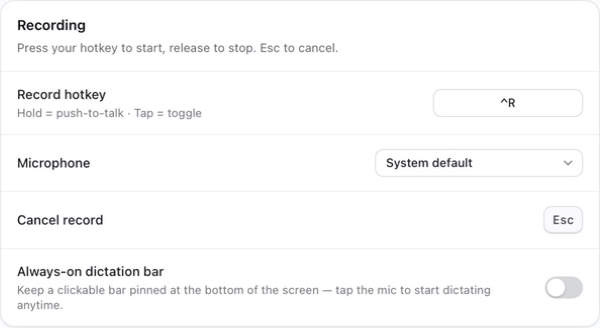
Hold your recording shortcut to speak, then release it to transcribe and insert the text into the focused app. A quick tap switches to hands-free recording. You can also keep a small dictation bar on screen, with the microphone always within reach.

02 / Give it a shape
A note, an email, or just your words.
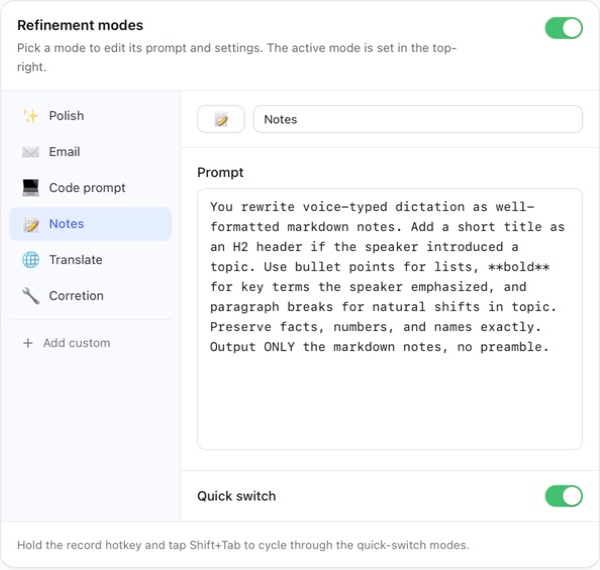
Leave refinement off for a direct transcription, or choose a mode for what you’re writing. Polish a sentence, organize a note, draft an email, or translate it. Each mode has an editable instruction, so you can make it work the way you do.
Refinement uses the local or cloud language-model provider you configure.
03 / Find your fit
Different languages. Different ways to listen.
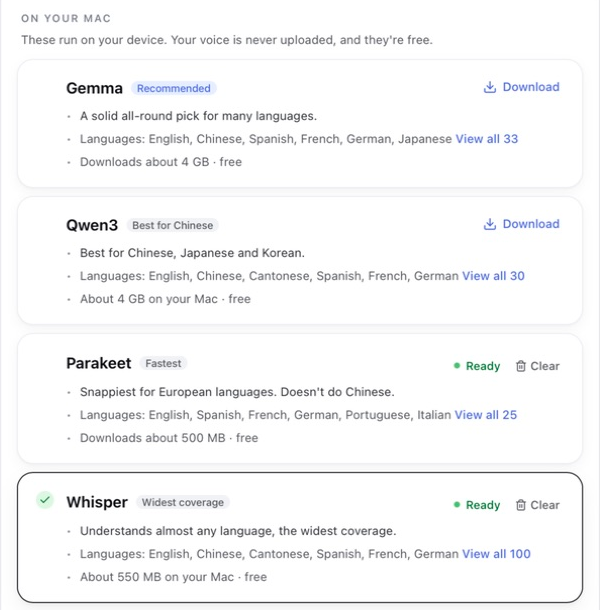
Choose a recognition engine for your language, your Mac, and the way you work. Vibeking offers on-device options including Whisper, Parakeet, Qwen3, and Gemma, alongside cloud providers. Download the local model you want, then select it when you’re ready.
04 / A choice you control
Know where your voice goes.
With a local recognition engine, your audio is transcribed on your Mac. Cloud recognition sends audio to the provider you choose; cloud refinement sends the text to its provider. Local models need an initial download. You can keep refinement off, or connect a local language model for that step too.
What’s next
Free to use. Open to build on.
Vibeking is open source under the MIT license. Download the Mac app, explore the source, or make it your own. Contributions welcome.
Get Vibeking on GitHub